I design and develop practical digital tools that support teaching, course design, and faculty decision-making. These projects combine instructional design, user experience, and interactive development to turn educational concepts and existing resources into tools that can be used in practice.

Interactive Tools for Course Planning
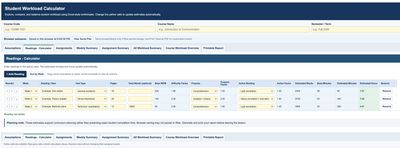
The Student Workload Calculators help faculty estimate the time students may need to complete common course activities, including readings, writing, presentations, research and data activities, applied and experiential work, collaborative activities, and exam preparation.
Rather than providing a single fixed estimate, the calculators allow faculty to enter details about an activity and explore how different design decisions may affect student workload. The estimates can be used to support decisions about course pacing, workload distribution, and balance across a course.
The project includes individual activity calculators as well as a broader course workload planning tool with weekly workload summaries and printable reports.
Project Status: Functional educational planning tools developed for faculty use.
Guided Faculty Course Self-Review
The Interactive TLX Course Quality Checklist transforms the original Course Quality Checklist from a static reference into a guided course self-review and improvement-planning experience.
Faculty can choose between a Full Course Quality Review and a Focused Course Reflection, depending on their needs. The interactive version includes contextual guidance, practical examples, reflection prompts, related TLX resources, space for notes, improvement priorities, and a printable review summary.
The tool is designed to support reflection and continuous improvement rather than produce a course quality score or formally evaluate teaching.
Project Status: Working prototype in faculty pilot testing.
Working with AI to Develop Meaningful Guidance for Students
The AI Guidance Designer is a faculty-support resource I developed to help educators create clear AI guidance for their courses and assessments.
The idea grew from my work on AI transparency, student decision-making, and AI guidance in teaching and learning. Instead of starting with “Is AI allowed?”, the process starts with learning: What do students need to learn? What should they be able to do themselves? What evidence of learning do we need to see? From there, faculty can decide where AI may or may not fit.
AI Skills (.md files) have also been explored through TLX professional development as a way to provide reusable instructions for working with generative AI. I applied this approach to the AI Guidance Designer so that faculty can work through the decisions with AI rather than simply asking AI to generate the guidance for them.
The .md file can be attached to an approved generative AI tool. It guides the conversation step by step, while the faculty member provides the teaching context, considers the recommendations, and makes the final decisions.
Project Status: Functional faculty-support resource developed for practical use.
evelynchan.ca
This is the official website of Evelyn Chan, Educational Technology and Digital Content Specialist in Ontario, Canada.
We use cookies to analyze website traffic and optimize your website experience. By accepting our use of cookies, your data will be aggregated with all other user data.